Are you wondering whether you can complete the entire Karnataka Gazette name change process from the comfort of your home in 2026? You've come to the right place. The Karnataka government has made significant strides in digitizing the name change process, but there's still a gap between what you can do online and what still requires physical presence. This complete guide breaks down exactly what you can do from home and what still requires a trip outside. We put everything you need to know in one place.
Karnataka Name Change Gazette Online — Quick Overview
Quick Answer: The name change gazette online Karnataka process is 90% digital. The other 10% are two offline steps which will not be removed in the near future — not because the government hasn't thought of it, but because of specific legal reasons.
Our team compiled this quick summary of what you can and cannot do online:
- Application submission — Complete online via e-Rajyapatra portal
- Document upload — Scan and upload from home
- Fee payment — Online via Khajane II (K2) gateway
- Application tracking — Real-time status updates online
- Gazette download — PDF available on the portal after publication
- Affidavit notarization — Requires physical visit to a Notary Public
- Newspaper cuttings — Requires physical collection of original newspapers
Why This Matters in 2026 — The Shift Away From the Government Press
Prior to the launch of the e-Rajyapatra portal, for a name change in Karnataka, it meant going to the Directorate of Printing, Stationery, and Publications (DPSP) in Bengaluru. You'd stand in line, send in paperwork, and then wait — often weeks — for a newspaper gazette to be physically delivered to you in the mail. That's gone now. [citation:1][citation:6]
The change signifies for applicants other than Bengaluru. No longer a need to make a trip to the state capital to submit paperwork; someone in Hubli, Mangaluru, or Mysuru now has a choice. All the process of uploading any document, downloading the final gazette notification, etc. is done via the portal. [citation:1][citation:6]
There was also the uncertainty of postal delivery which was avoided by the Karnataka e-gazette application online system. Your gazette is a digitally signed PDF with a QR code which is valid for Passports, PAN updates, bank KYC, and for all government departments. [citation:1][citation:10]
Actionable takeaway: If you have not visited the e-Rajyapatra portal, bookmark it. That's where you will start and end your application. The official website is erajyapatra.karnataka.gov.in. [citation:2][citation:3][citation:6]
The Digital Parts: What the e-Rajyapatra Portal Actually Handles
This is the part most applicants underestimate. The portal does a lot. [citation:1][citation:6]
- Registration and Application: You will register on the e-Rajyapatra website, complete the application form to change name, and select the appropriate Part. Incorrectly selecting the Part is a frequent application rejection criteria. [citation:1][citation:6]
- Document Upload: Affidavit, newspaper cuttings, identity proofs – scanned copies. No documents or hand delivery, just a courier. [citation:1][citation:6]
- Fee Payment: It is made via Khajane II (K2) which is the integrated payment system of the government. Options like UPI, net banking, and debit cards are available. A warning is in order in this case: K2 timeouts in peak hours! Avoid using this payment method when you have a slow Internet connection or when you are in a hurry. [citation:1][citation:6][citation:9]
- Application Tracking: Real-time status update in the portal. Your application will go through Submitted, Under Verification, Approved, and Published. When the gazette is published, you also receive an SMS notification on your registered mobile number. [citation:1][citation:6]
- Download: When published, you login and download the gazette PDF. No longer must you wait for a physical copy to be in your mailbox. The downloaded PDF is legally valid and accepted by all government departments. [citation:2][citation:3][citation:10]
Actionable takeaway: Make sure to have your scanned files available when you log on to the portal. If you don't scan any documents while the upload window is idle, the upload step will time out.
The Offline Parts: Where You Still Have to Step Out
Two things can't be done digitally yet. Both are deliberate. [citation:4][citation:6][citation:8]
1. Notarizing the Affidavit
The affidavit should be signed by a Notary Public or First Class Magistrate and be on a stamp paper bearing the stamp of the notary. This should be signed by their physical signature, and stamped with their official seal. [citation:4][citation:7]
The legal reason: "Wet signatures" on affidavits are in place to help deter identity theft. The existing system simply doesn't have the resources to verify an affidavit that would be only in electronic form. [citation:4]
Cost estimate: Non-judicial stamp paper ₹20–₹100, notary charges ₹200–₹500. [citation:7][citation:9]
2. Collecting Newspaper Cuttings
The name change has to be published in one Kannada language newspaper and one English language newspaper. Ads can be booked online via the newspaper's website or a booking platform. That portion is digital. [citation:5][citation:8]
What's not digital: The actual newspapers must be delivered, and the notice needs to be cut out of them. That physical cutting will then be scanned and uploaded to the portal. Unfortunately, you cannot take a screenshot of the newspaper's website. The print clipping must be the original piece of the newspaper. [citation:6][citation:8]
Newspaper ad cost (2026 rates):
| Newspaper | Language | Rate (Per Insertion) |
|---|---|---|
| Times of India Bangalore | English | ₹1,480 |
| Deccan Herald | English | ₹1,250 |
| Prajavani | Kannada | ₹1,100 |
| Vijayavani | Kannada | ₹1,000 |
Source: changeofname.in [citation:6]
Actionable takeaway: When booking newspaper ads, please do so at least 4-5 days in advance, so that the ads can be sent and the cuttings collected.
Step-by-Step Breakdown of the Hybrid Process
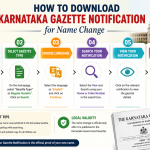
Here's how the name change process in Karnataka actually works, in sequence: [citation:1][citation:8][citation:9]
Step 1 — Draft and Notarize Your Affidavit (Offline)
Purchase stamp paper. Write the affidavit with your old name, new name, reason for change, and address. Get it signed and stamped by a Notary Public. Save the original as is for upload. Keep at least 3-4 copies notarized at the time of signing. [citation:9]
Step 2 — Publish in Two Newspapers (Offline/Online)
Publish a classified notice in both Kannada and English newspapers. Wait for delivery. Gather the cuttings. Scan both cuttings at 300 DPI or higher — blurry scans are the top reason for rejection. [citation:1][citation:6]
Step 3 — Register and Apply on the e-Rajyapatra Portal (Online)
Create your account. Fill in the application. Choose Part 2 (changes to personal names are in Part 2, not Part 4 or others). Upload the scan of your affidavit, newspaper cuttings, and identity documents. [citation:1][citation:9]
Step 4 — Pay via Khajane II (Online)
Pay the fees via the K2 gateway. Take a screenshot of the payment confirmation; it will be useful in case of any dispute. The Gazette fee for general citizens is approximately ₹650–₹700. [citation:6][citation:9]
Step 5 — Track and Download (Online)
Follow up on the application. When it appears under "Published," log in and download your gazette notification PDF. The PDF will serve as your legal proof of name change. Publication typically takes 30–45 days after submission. [citation:1][citation:8]
Why Fully Digital Isn't Possible Yet — The Legal Reality
Two laws are at work here. [citation:4]
The Indian law has not yet allowed for the digital signature to be as valid as a wet signature for personal sworn statements, and the processes in the state cannot be uniformly depended on them. This is an anticipated gap in the digital infrastructure space, not bureaucratic delay. [citation:4]
Newspaper publication is a result of the Press and Registration of Books Act, which provides that a public notice in the physical newspaper is the legal basis for making a "public announcement." This publication must be completed and evidence provided before the gazette notification can be issued. Physical newspaper cuttings will be a part of the process until this law is amended. [citation:4]
It's one thing that's really hit a legal wall, not a process wall, when it comes to digital transformation.
Common Mistakes That Get Applications Rejected
These aren't theoretical. They are the reasons that applications are returned with comments like "reject." [citation:1][citation:6]
- Blurry Newspaper Scans: The highest incidence of rejection. Scan on a flatbed scanner at 300 DPI. Your notice should be clearly visible and readable, including the newspaper name, the wording of your notice, and the date of publication. [citation:1]
- Name Mismatch Between Affidavit and Online Form: The name mentioned in the affidavit is "Ramesh Kumar Sharma" and you type "Ramesh K. Sharma" in the portal. The difference results in a rejection. Type the names on the form word for word from the affidavit. [citation:6]
- Wrong Part Selection: Personal name changes will be in Part 2 of the gazette. One of the more common errors is choosing Part 4 (trade name changes/business notifications). The portal does not tell you very loudly about this. [citation:1][citation:9]
- Uploading Incomplete Affidavit: This needs to be a single image or multi-page scanned affidavit with the stamp paper header, the entire text of the affidavit, and the notary's signature and seal. If you remove the header from the file to save space, it will be rejected. [citation:1]
Actionable takeaway: Examine each scan at 100% zoom on a desktop screen before uploading. If the verifier can't read it, they can't approve it.
Tools and Quick Wins for a Smoother Application
- e-Rajyapatra Portal (erajyapatra.karnataka.gov.in): The only official submission portal for Karnataka e-gazette application online. Don't use third-party services that claim to submit on your behalf unless you've verified them independently. [citation:2][citation:3][citation:6]
- Khajane II (K2) Payment Gateway: Built into the portal. Try to use net banking during off hours (early morning or late evening) so that you do not get a timeout. While UPI functions, such confirmed payment receipts can take some minutes to be generated. [citation:1][citation:6]
- CamScanner or Adobe Scan: Better document scanning apps than regular phone camera apps. They automatically correct perspective and enhance readability. Not an alternative to a flatbed scanner if you have an average phone camera. [citation:1]
- SMS Alert System: No need to constantly monitor the portal. An SMS message is sent to your registered mobile on the release of gazette. Remember to register the same mobile number you have on your Aadhaar — some verifications will cross-check with this. [citation:1]
Quick win you can do today: Login to the e-Rajyapatra portal and simply register. Once you have the notarized affidavit and the newspaper cuttings, you're ready to submit. The whole registration process is completed in less than 10 minutes.
Frequently Asked Questions About Name Change Gazette Online Karnataka
Q. Do I need to visit the Government Press in Bengaluru at any point to complete the name change gazette online Karnataka process?
No, you would not even visit the DPSP under the present system. All submissions, payments, tracking, and downloading of the final gazette occur through the e-Rajyapatra portal. The traditional method of going to the press has come to the end of its days. [citation:1][citation:6]
Q. Is a Digital Signature Certificate (DSC) required to apply for a Karnataka name change gazette online?
No DSC is required from the applicant. Login is with a regular ID/password. Government officials digitally sign the gazette on their side — this doesn't need to be arranged by you. [citation:1]
Q. Can I use e-stamp paper for my name change affidavit?
Yes — e-stamp papers are valid in Karnataka. The challenge people face is that they will still need to get a Notary to stamp and sign the paper copy even if they have an e-stamp. Note: The e-stamp is not a substitute for the notarization process; it is a replacement for buying stamp paper. [citation:4]
Q. How do I know when my name change gazette is published?
You get an SMS on your registered mobile. After login, you will find under "My Applications" a link to the gazette issue. Get it from there. The PDF comes with a QR code which any government office can scan to verify the authenticity. [citation:1][citation:10]
Q. Is the downloaded PDF legally valid, or do I need a physical certificate?
The PDF is a completely valid document. The name change in Karnataka e-gazette with digital signature has been accepted by banks, passport offices, schools, and all government departments. There is no longer a physical gazette — the PDF is the document. [citation:1][citation:2][citation:10]
Q. What happens if the portal rejects my name change application?
Specific comments on rejection, such as "newspaper name not visible" or "affidavit stamp paper not clear," are on the portal. Correct the error, re-upload the corrected documents. If the re-submission occurs within the time period mentioned in the rejection notice, the fee will not be refunded. Take heed to the comments before re-uploading or else it will be rejected once again. [citation:1]
Karnataka Name Change Gazette Online — Key Takeaways
- The Karnataka Gazette name change process is 90% digital — the e-Rajyapatra portal handles application, upload, payment, tracking, and download [citation:1][citation:6]
- Two offline steps remain: notarizing the affidavit (physical visit to Notary) and collecting original newspaper cuttings [citation:4][citation:8]
- Gazette fee for general citizens is ₹650–₹700; total DIY cost ranges from ₹2,400–₹4,300 [citation:6][citation:7][citation:9]
- Publication takes 30–45 days after submission — gazette is published weekly on Thursdays [citation:1][citation:8]
- Download your PDF from erajyapatra.karnataka.gov.in — the digitally signed PDF is legally valid for all purposes [citation:2][citation:3][citation:10]
- Keep at least 5 printed and self-attested copies of your Gazette PDF ready for updating Aadhaar, PAN, Passport, and bank records [citation:8]
This article is for informational purposes only. For case-specific legal advice, consult a qualified legal professional or a certified name change service provider.